How to connect PayPal and start taking card payments
In a few minutes your customers can pay you by card from the receipt you send on WhatsApp. Here is the setup.
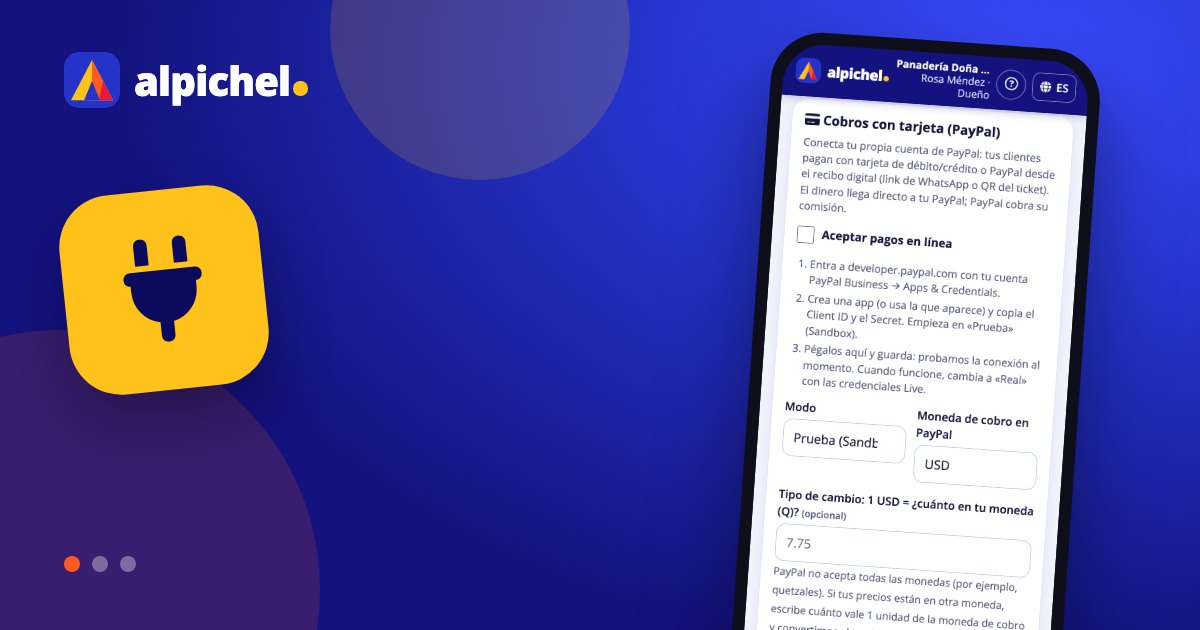
1. Get your PayPal credentials
Go to developer.paypal.com with your PayPal Business account and open "Apps & Credentials". Start on the Sandbox (test) tab: create an app or use the default one and copy the Client ID and Secret.
2. Paste them in alpichel
Go to More → Settings → Card payments, tick "Accept online payments", choose Test mode, the charge currency and, if needed, the exchange rate. Paste the Client ID and Secret and save: we test the connection right away.
3. Test and go live
Create an unpaid sale, send the ticket on WhatsApp and pay it with a PayPal test account. If all goes well, repeat step 1 on the Live tab, paste those credentials and switch the mode to Live.
Keep reading
 Guides
Start selling in 10 minutesStep-by-step guide to get Alpichel running: business type, catalog, team, cash register and first sale, in under 10 minutes.
Guides
Start selling in 10 minutesStep-by-step guide to get Alpichel running: business type, catalog, team, cash register and first sale, in under 10 minutes.
 Guides
Control your inventoryPractical inventory guide: what to count, how to set minimums, log purchases with cost, run counts and reduce losses.
Guides
Control your inventoryPractical inventory guide: what to count, how to set minimums, log purchases with cost, run counts and reduce losses.
 Guides
Reconcile your registerGuide to daily cash reconciliation: opening cash, expenses, tips, payment methods and how to investigate differences.
Guides
Reconcile your registerGuide to daily cash reconciliation: opening cash, expenses, tips, payment methods and how to investigate differences.
